Modern office with high-fidelity OA portal and mobile approval interfaces on real devices

CONNECTED WORKPLACE

Office OA System

Connect organization, workflows, documents and execution in one workplace

For growing companies, group headquarters, public institutions and multi-entity organizations, combining inbox, approvals, documents, contracts, expenses, meetings, assets and mobile work on unified identity and access.

  • One access contextOrganization, position, role and data scope
  • One workflow per taskForm, route, approval and execution
  • Fully auditableChanges, delegation, seals and exports

PRODUCT POSITIONING

Collaboration infrastructure beyond approvals

Create one chain across organization, tasks, workflows and records to reduce duplicated entry, disconnected approvals and untracked execution.

Employees

Complete work in one place

See tasks, submit requests, track status and receive notices.

Department leaders

Approve with context

View budget, history, attachments and related matters.

HR and administration

Put policy into operation

Coordinate people, access, meetings, assets and documents.

Finance and legal

Align rules and evidence

Connect budgets, expenses, contracts, seals and archives.

Leadership and IT

See efficiency and risk

Govern cycle time, exceptions, integrations and access risk.

WORK JOURNEY

Eight steps from request to archived execution

Approval is not the end; the platform continues through execution, evidence and archive.

  1. 01

    Open the workspace

    Unified identity and role portal

  2. 02

    Select a form

    Role-based service catalog

  3. 03

    Enter and validate

    Master data and business rules

  4. 04

    Generate the route

    Amount, entity and conditions

  5. 05

    Process on any device

    Approve, return, delegate or add reviewers

  6. 06

    Execute follow-up

    Purchase, pay, seal or publish

  7. 07

    Return evidence

    Results, files and system updates

  8. 08

    Archive and analyze

    Full history enters reporting

ORGANIZATION & PORTAL

Keep org changes, access and inboxes aligned

Support multiple entities, departments, secondary assignments, delegates and data scopes with lifecycle-aware access.

Three employees reviewing high-fidelity organization structure, role access and unified task workspace
Organization, access and unified workspaceOrganization · Position · Role · Delegate · Inbox · Portal
01

Organization and staff data

Maintain entities, departments, positions, reporting lines and employment status.

02

Role and data access

Authorize functions, fields, organizations and record scopes separately.

03

Delegation and handover

Manage tasks, access and files through leave, transfer and exit.

04

Personalized portal

Aggregate tasks, calendar, notices, applications and role metrics.

APPROVAL ENGINE

Show rules, context and next steps in every approval

Configure conditional routes, parallel or any approval, added reviewers, delegation, return, withdrawal and SLA escalation.

Employee and manager processing a high-fidelity purchase request and approval route
Multi-Device Workflow and Execution TrackingForm · Route · SLA · Delegate · Comment · Attachment
01

Configurable forms

Fields, tables, related data, calculations and validation follow the process.

02

Rule-based routing

Entity, position, amount and conditions jointly determine approvers.

03

Approval context

Show history, budget, attachments and risk cues in one view.

04

SLA and exceptions

Reminders, escalation and bottlenecks enter operating queues.

DOCUMENTS & CONTRACTS

Govern each draft, review, seal and archive

The platform manages workflow, versions and access; authorized roles remain responsible for legal and seal decisions.

Legal and administration team reviewing high-fidelity contract versions, circulation, seal status and audit history
Documents, contracts and seal workflowDraft · Version · Review · Seal · Sign · Archive
Document circulationNumbering, drafting, review, approval, distribution and receipt
Contract registerCounterparty, versions, term, obligations and renewal
Seal managementSeal, purpose, copies, authorization and custody record
Document archiveClassification, access, search, download approval and audit

EXPENSE & BUDGET

Connect requests, budgets, receipts and payments

Expense policy, budget logic and finance integrations follow company rules; alerts do not replace financial review.

Employee submitting expenses while finance reviews high-fidelity receipts, budget, exceptions and reconciliation
Expense and finance collaborationRequest · Receipt · Budget · Approval · Payment · Reconcile
01

Pre-Expense requests

Travel, purchasing and expenses link to budget and standards first.

02

Receipt capture

Image recognition assists duplicate checks while originals follow policy.

03

Rules and exceptions

Over-limit, missing receipt, over-budget and duplicates remain explicit.

04

Payment and reconciliation

Approval, payment and accounting evidence continue to update.

MEETINGS & ASSETS

Coordinate meetings, spaces and office assets

Connect booking, attendance, agenda, actions and equipment checkout to reduce conflict and unclear ownership.

Meeting room with high-fidelity agenda, room status and asset checkout screens
Meeting space and office asset coordinationBook · Check in · Agenda · Action · Checkout · Maintain
Room bookingCapacity, equipment, conflicts, check-in and release
Meeting executionAgenda, materials, minutes, decisions and actions
Asset registerCode, location, custodian, status and depreciation basis
Checkout and maintenanceScan, return, fault, repair and count

OPERATIONS CENTER

Govern efficiency, bottlenecks, risks and health

Authorized administrators review process metrics, exceptions, integrations and audit events.
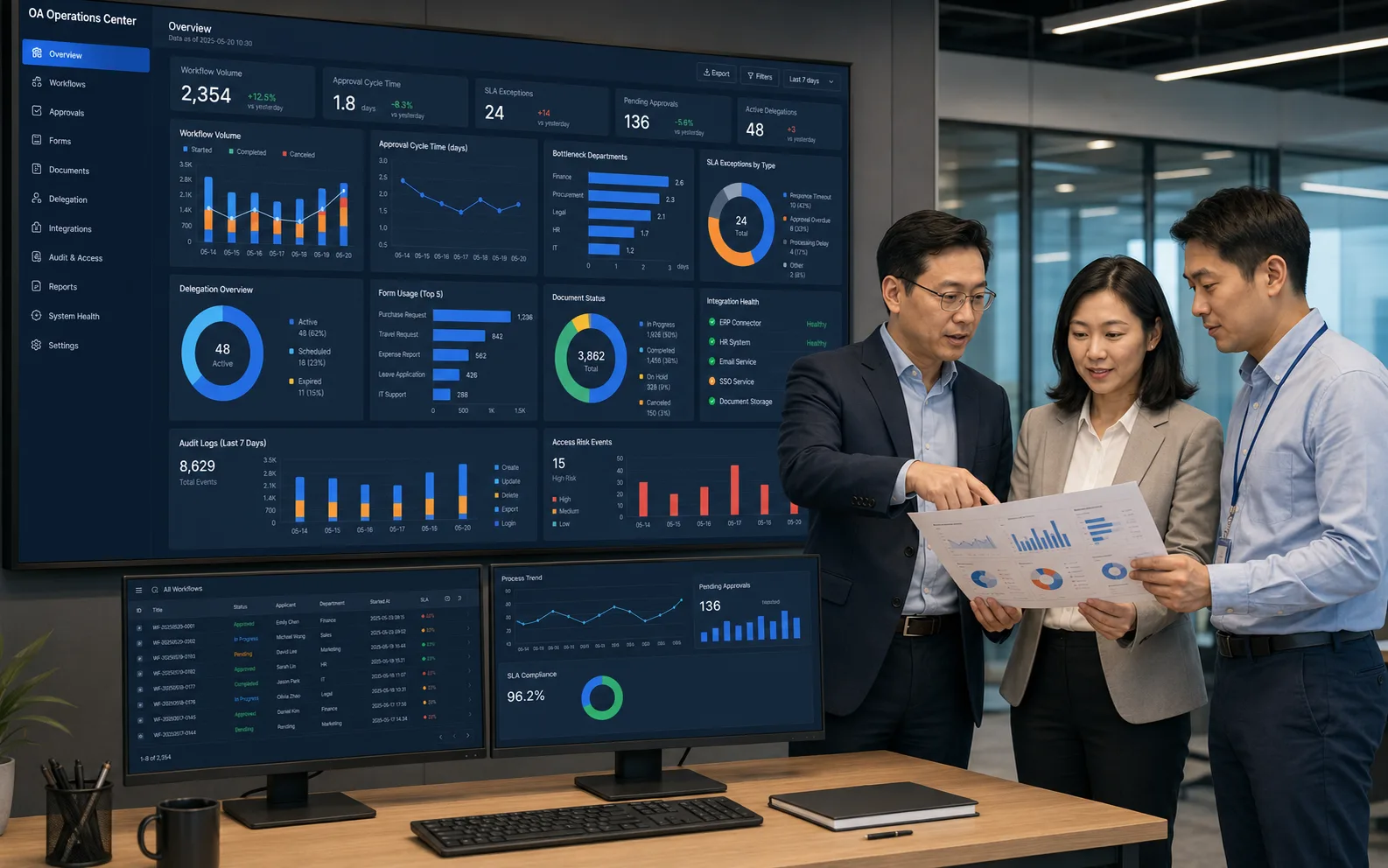
Enterprise team viewing a high-fidelity OA operations dashboard with cycle time, SLA, integrations and access risk
Process Operations & System Governance CenterCycle · Bottleneck · SLA · Form · Integration · Audit · Risk
Process analyticsVolume, approval rate, cycle time, returns and bottlenecks
Exception operationsTimeout, missing approver, expired delegate and late execution
Integration healthIdentity, finance, HR, documents and messaging
Security auditLogin, grants, exports, amendments and high-risk events

APPLICATION SCENARIOS

Scale core approvals to group collaboration

Define scope around organization size, policy maturity, existing systems and integration constraints.

01

Growing companies

Unified portal, core approvals, expenses and administration.

02

Groups and legal entities

Delegated control, cross-company workflows and shared standards.

03

Institutions and associations

Documents, meetings, contracts, assets and accountable records.

04

Project organizations

Coordinate project, budget, purchasing, contract and delivery.

PROJECT CONSULTATION

Plan OA around real policies and workflows

Assess access, workflow inventory, form migration, integrations and phased rollout.

Discuss a project13269500661