
Connect requirements and gates
Manage portfolios, milestones, deliverables and review criteria.
GOVERNED DIGITAL THREAD
Connect requirements, designs, BOMs and approved changes
Built for complex product organizations, the platform governs requirements, projects, items, documents, EBOMs, configurations, reviews, engineering changes, releases and quality feedback so every valid version, decision and downstream handoff stays traceable.
PRODUCT POSITIONING
Centered on products, items, documents, BOMs, configurations and versions, the platform connects engineering, manufacturing, sourcing, quality, suppliers and service teams to the same controlled facts.
Manage portfolios, milestones, deliverables and review criteria.
Link CAD, drawings, specifications, items, versions and references.
Govern classification, attributes, lifecycles, check-in and release.
Align EBOM, MBOM, BOP, effectivity and readiness tasks.
Connect risks, validation, issues, actions and approved changes.
Monitor maturity, change backlog, overdue work and integrations.
Duplicate names, obsolete drawings, manual BOMs, chat approvals and repeated entry make it hard to know which version is valid, who is affected and when a change takes effect.
Mechanical, electrical, electronic, software and manufacturing views disagree.
Manufacturing, quality and service issues lose their product context.
PRODUCT LIFECYCLE
Each stage defines inputs, deliverables, owners, evidence and release criteria. Advancing a project does not automatically approve its product data.
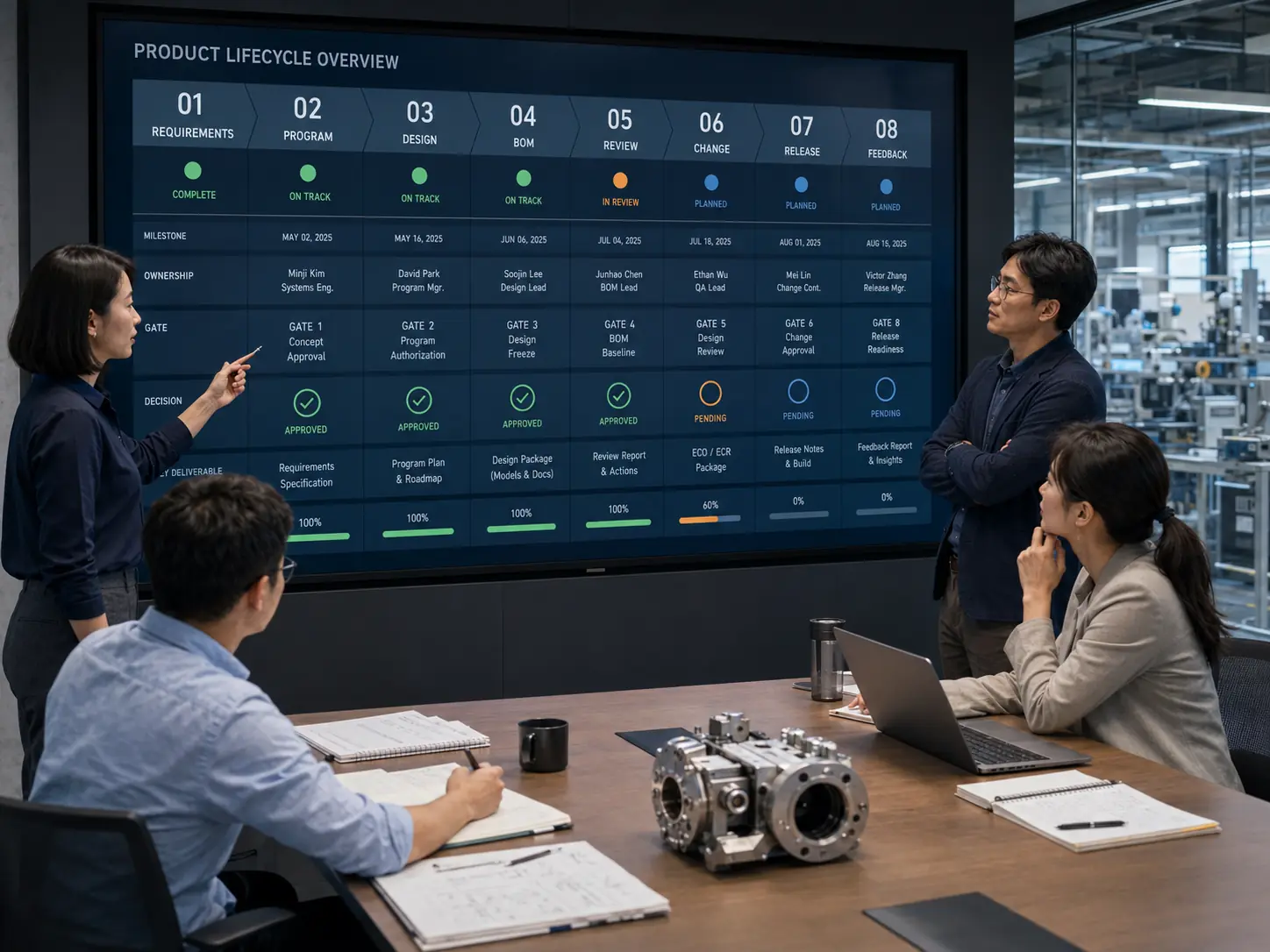
Record source, priority, owner, acceptance criteria and baseline.
Configure milestones, deliverables, reviews, resources and criteria.
Govern identifiers, attributes, models, drawings and check-in.
Create multi-domain structures, variants, alternates and effectivity.
Connect review notes, simulation, prototypes, risks and evidence.
Identify affected objects, cost, stock, suppliers, plants and work.
Publish approved configurations with effectivity and tasks.
Turn field issues into changes, service plans and archives.
REQUIREMENTS & PORTFOLIO
Requirements retain sources and acceptance criteria while stage gates bind deliverables and evidence. Leaders make priority, resource and risk decisions on transparent information.

Requirement baseline: connect market, customer, regulatory and field inputs to owners, acceptance criteria, priority and version before they become controlled design inputs.
Link requirements to specifications, tests, items and releases.
Review deliverables, risks, open actions and authorized decisions.
Record priority, resource conflicts, scope changes and cancellations.
PRODUCT DEFINITION
Mechanical, electrical, electronic and software objects share governed identifiers, versions and relationships. PLM controls structure and state without replacing CAD, ECAD, CAE or ALM authoring tools.

ONE GOVERNED PRODUCT DEFINITION
Treat the product structure as a relationship network rather than a static spreadsheet. Every object carries ownership, maturity, applicability and a controlled version.
ENGINEERING CHANGE
A request explains purpose and scope before teams assess affected items, BOMs, files, projects, stock, suppliers and plants. Execution begins only after authorized approval.
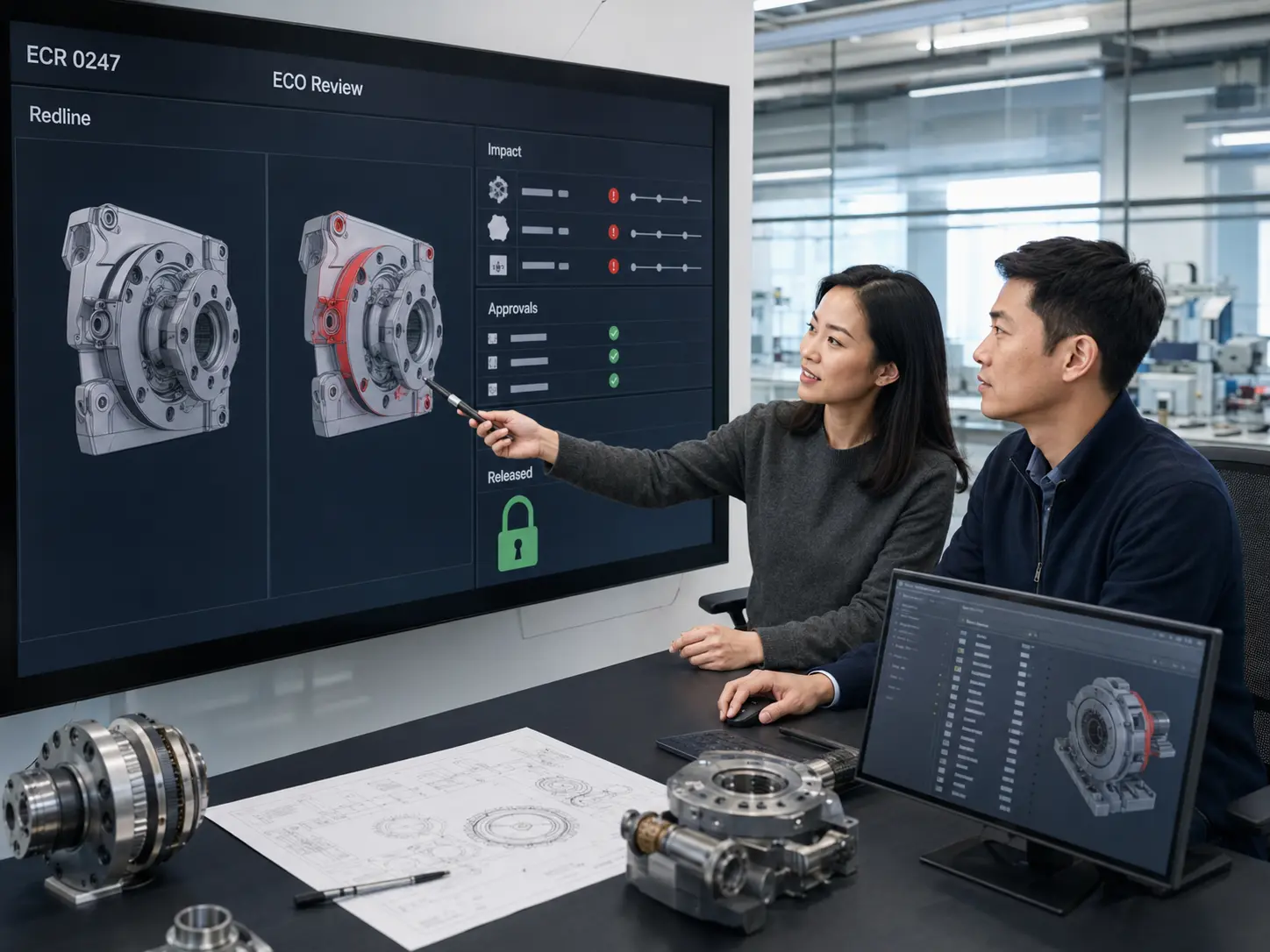
Capture reason, issue source, target, urgency and scope.
Review objects, stock, cost, suppliers, plants and validation.
Apply discipline, organization, value, risk and product rules.
Create tasks, apply effectivity and verify downstream evidence.
Impact analysis: show affected items, BOMs, files, active projects, inventory, suppliers, plants and validation work while accountable experts confirm the conclusion.
MANUFACTURING HANDOFF
Engineering release is more than exporting files. Downstream teams need explicit object versions, MBOM mappings, readiness work, supplier data, effectivity and open actions.

RIGHT DATA, RIGHT CONTEXT
Handoff preserves mappings, differences and ownership between engineering and manufacturing views. Software may assist comparison, but experts own restructuring, routing and manufacturing decisions.
QUALITY & COMPLIANCE
Issues link to products, versions, serials, components, validation and changes. The traceable loop supports corrective work without automatically proving product safety or regulatory conformity.

Resolve a field, lot or serial issue to product versions and items.
Link tests, hazards, requirements, review notes and conclusions.
Move corrective actions requiring design updates into ECR and ECO.
Quality, regulatory and engineering owners authorize signatures.
PLM OPERATIONS
Operations goes beyond project charts to govern classification, workflows, baseline policy, external access, integration failures, account lifecycles and administrator actions.

APPLICATION SCENARIOS
Adopt PLM in phases based on product complexity, organizational boundaries, regulatory needs and the current system landscape without replacing every engineering tool at once.
Configurations, alternates, changes, supplier data and launch.
Mechanical, electronic, firmware and software releases.
Reuse, custom engineering, customer options and readiness.
Configure processes and evidence while experts own compliance.
Electrical, structural, controls, baselines and change effectivity.
Multi-organization work and least-privilege partner access.
SYSTEM BOUNDARIES
The platform governs product data, processes, relationships and evidence. It does not automatically guarantee design correctness, product safety, compliance or business outcomes.
No. PLM governs product definitions, versions, configurations, changes and releases while CAD, ERP, MES and QMS retain professional design, transactions and execution.
No. It can assist impact analysis, routing, reminders and evidence summaries, but authorized people must own engineering judgment, quality signatures and release.
Object mappings, difference review, change tasks, effectivity and integration exception queues support alignment while engineering and manufacturing experts confirm restructuring.
Yes. Least-privilege access can be limited by project, object, version, classification and time, with audit records for views, downloads, comments and returns.
BUILD A GOVERNED PRODUCT THREAD
Define the object model, access, stage gates, engineering changes and integration boundaries around the current CAD, ERP, MES and QMS landscape.